                   _____ _
                  /__   \ |__   ___
                    / /\/ '_ \ / _ \
                   / /  | | | |  __/
                   \/   |_| |_|\___|

    __ _          _ _               _            _
   / _\ |__   ___| | |   /\  /\__ _| |_ ___ _ __( )__
   \ \| '_ \ / _ \ | |  / /_/ / _` | __/ _ \ '__|/ __|
   _\ \ | | |  __/ | | / __  / (_| | ||  __/ |   \__ \
   \__/_| |_|\___|_|_| \/ /_/ \__,_|\__\___|_|   |___/

                           _ _                 _
      /\  /\__ _ _ __   __| | |__   ___   ___ | | __
     / /_/ / _` | '_ \ / _` | '_ \ / _ \ / _ \| |/ /
    / __  / (_| | | | | (_| | |_) | (_) | (_) |   <
    \/ /_/ \__,_|_| |_|\__,_|_.__/ \___/ \___/|_|\_\



#!/bin/sh
# Usage: hello <name>

name="$1"

if [ "$name" = "world" ]
then
    echo "you're so cliché"
else
    echo "hello $name"
fi
#!/bin/sh
# Usage: hello <name>
name="$1"
if [ "$name" = "world" -a "$LOGNAME" != "boss" ]
then
echo "you're so cliché"
else
echo "hello $name"
fi#!/bin/sh
# Usage: hello <name>
name="$1"
if [ "$name" = "world" -a "$LOGNAME" != "boss" ] ||
[ `hostname` = "mordor" ]
then
echo "you're so cliché"
else
echo "hello $name"
fi#!/bin/sh
# Usage: hello <name>
name="$1"
if [ "$name" = "world" -a "$LOGNAME" != "boss" ] ||
[ `hostname` = "mordor" ]
then
echo "you're so cliché"
elif [ -z "$name" ]
then
echo "Usage: hello <name>"
false
else
echo "hello $name"
fi#!/bin/sh
# Usage: hello <name>
name="$1"
if [ "$name" = "world" -a "$LOGNAME" != "boss" ] ||
[ `hostname` = "mordor" ]
then
echo "you're so cliché"
elif [ -z "$name" ] && grep -q "^$name:" /etc/passwd
then
echo "Usage: hello <name>"
false
else
echo "hello $name"
fi$ man if
No manual entry for if
$ man if
BUILTIN(1)                BSD General Commands Manual               BUILTIN(1)

NAME
     builtin, !, %, ., :, @, {, }, alias, alloc, bg, bind, bindkey, break,
     breaksw, builtins, case, cd, chdir, command, complete, continue, default,
     dirs, do, done, echo, echotc, elif, else, end, endif, endsw, esac, eval,
     exec, exit, export, false, fc, fg, filetest, fi, for, foreach, getopts,
     glob, goto, hash, hashstat, history, hup, if, jobid, jobs, kill, limit,
     local, log, login, logout, ls-F, nice, nohup, notify, onintr, popd,
     printenv, pushd, pwd, read, readonly, rehash, repeat, return, sched, set,
     setenv, settc, setty, setvar, shift, source, stop, suspend, switch,
     telltc, test, then, time, times, trap, true, type, ulimit, umask,
     unalias, uncomplete, unhash, unlimit, unset, unsetenv, until, wait,
     where, which, while -- shell built-in commands

SYNOPSIS
     builtin [-options] [args ...]

DESCRIPTION
     Shell builtin commands are commands that can be executed within the run-
     ning shell's process.  Note that, in the case of csh(1) builtin commands,
     the command is executed in a subshell if it occurs as any component of a
     pipeline except the last.

     If a command specified to the shell contains a slash ``/'', the shell
     will not execute a builtin command, even if the last component of the
     specified command matches the name of a builtin command.  Thus, while
     specifying ``echo'' causes a builtin command to be executed under shells
     that support the echo builtin command, specifying ``/bin/echo'' or
     ``./echo'' does not.

     While some builtin commands may exist in more than one shell, their oper-
     ation may be different under each shell which supports them.  Below is a
     table which lists shell builtin commands, the standard shells that sup-
     port them and whether they exist as standalone utilities.

     ...
$ help if
if: if COMMANDS; then COMMANDS;
    [ elif COMMANDS; then COMMANDS; ]...
    [ else COMMANDS; ]
    fi

    The `if COMMANDS' list is executed.  If its exit status is zero, then the
    `then COMMANDS' list is executed.  Otherwise, each `elif COMMANDS' list is
    executed in turn, and if its exit status is zero, the corresponding
    `then COMMANDS' list is executed and the if command completes.  Otherwise,
    the `else COMMANDS' list is executed, if present.  The exit status of the
    entire construct is the exit status of the last command executed, or zero
    if no condition tested true.
$ man [
TEST(1)      BSD General Commands Manual     TEST(1)

NAME
     test, [ -- condition evaluation utility

SYNOPSIS
     test expression
     [ expression ]

DESCRIPTION
     The test utility evaluates the expression and, if it
     evaluates to true, returns a zero (true) exit status;
     otherwise it returns 1 (false).  If there is no
     expression, test also returns 1 (false).

     All operators and flags are separate arguments to the
     test utility.

     The following primaries are used to construct expres-
     sions:
...
$ which [
/bin/[
$ ls -l /bin/[
-r-xr-xr-x  2 root  62K May 18  2009 /bin/[
on mac
$ diff -s /bin/[ /bin/test
Files /bin/[ and /bin/test are identical
TODO make incremental exit status /bin/[ just for fun
$ test 1 = 1
$ echo $?
0

$ test 1 = 0
$ echo $?
1

$ /bin/[ 1 = 0
$ echo $?
1
#!/bin/sh
# Usage: hello <name>

name="$1"

if test "$name" = "world" -a "$LOGNAME" != "boss" ||
   test `hostname` = "mordor"
then
    echo "you're so cliché"
elif test -z "$name" && grep -q "^$name:" /etc/passwd
then
    echo "Usage: hello <name>"
    false
else
    echo "hello $name"
fi
#!/bin/sh
# Usage: hello <name>
name="$1"
if test "$name" = "world" -a "$LOGNAME" != "boss" ||
test `hostname` = "mordor"
then
echo "you're so cliché"
elif test -z "$name" && grep -q "^$name:" /etc/passwd
then
echo "Usage: hello <name>"
false
else
echo "hello $name"
fi#!/bin/sh
# Usage: hello <name>
name="$1"
if test "$name" = "world" -a "$LOGNAME" != "boss" ||
test `hostname` = "mordor"
then
echo "you're so cliché"
elif test -z "$name" && grep -q "^$name:" /etc/passwd
then
echo "Usage: hello <name>"
false
else
echo "hello $name"
fiwhile true
do
echo "boom"
sleep 1
done
$ which true
/bin/true
$ which false
/bin/false
while /bin/true
do
    echo "boom"
    sleep 1
done
while [ $# -gt 0 ]
do
    echo "$1"
    shift
done
while test $# -gt 0
do
    echo "$1"
    shift
done
$ url="http://www.gutenberg.org/files/1080/1080.txt"
$ curl -s "$url"
The Project Gutenberg EBook of A Modest Proposal, by Jonathan Swift

Title: A Modest Proposal
       For preventing the children of poor people in Ireland,
       from being a burden on their parents or country, and for
       making them beneficial to the publick - 1729

Author: Jonathan Swift

Posting Date: July 27, 2008 [EBook #1080]
Release Date: October 1997

Language: English

A MODEST PROPOSAL

For preventing the children of poor people in Ireland, from being a
burden on their parents or country, and for making them beneficial to
the publick.

...
$ curl -s "$url" |tr -c "A-Za-z" '\n'
The
Project
Gutenberg
EBook
of
A
Modest
Proposal

by
Jonathan
Swift

Title


A
Modest
Proposal
For
preventing
$ curl -s "$url" |tr -c "A-Za-z" '\n' |grep -v '^$'
The
Project
Gutenberg
EBook
of
A
Modest
Proposal
by
Jonathan
Swift
Title
A
Modest
Proposal
For
preventing
curl -s "$url" |tr -c "A-Za-z" '\n' |grep -v '^$'
curl -s "$url"      |
tr -c "A-Za-z" '\n' |
grep -v '^$'        |
sort
$ curl -s "$url" |tr -c "A-Za-z" '\n' |grep -v '^$' |sort
A
A
A
A
A
A
A
A
A
ACTUAL
AGREE
AGREE
AGREEMENT
AK
AND
ANY
ANY
ANY
ANYTHING
AS
ASCII
ASCII
ASCII
About
Additional
After
American
American
An
An
And
curl -s "$url"      |
tr -c "A-Za-z" '\n' |
grep -v '^$'        |
sort                |
uniq -c
$ curl -s "$url" |tr -c "A-Za-z" '\n' |grep -v '^$' |sort |uniq -c
   9 A
   1 ACTUAL
   2 AGREE
   1 AGREEMENT
   1 AK
   1 AND
   3 ANY
   1 ANYTHING
   1 AS
   3 ASCII
   1 About
   1 Additional
   1 After
   2 American
   2 An
   5 And
   2 Anonymous
   1 Any
  13 Archive
   4 As
   1 Author
   2 B
   1 BE
   1 BEFORE
   2 BREACH
   1 BUT
   1 Barbadoes
   7 But
curl -s "$url"      |
tr -c "A-Za-z" '\n' |
grep -v '^$'        |
sort                |
uniq -c             |
sort -rn
$ curl -s "$url" |tr -c "A-Za-z" '\n' |grep -v '^$' |sort |uniq -c |sort -rn
 327 the
 237 of
 182 to
 178 and
 141 a
 126 in
 107 or
  83 Project
  83 Gutenberg
  69 be
  63 for
  60 this
  58 with
  57 tm
  55 by
  55 I
  52 you
  51 that
  50 work
  47 is
  45 as
  43 at
  42 will
  41 are
  40 any
  38 their
  36 it
#!/bin/sh
# Usage: wordfreq <url>
# Show top 25 words in document at <url>.

url="$1"

curl -s "$url"      |
tr -c "A-Za-z" '\n' |
grep -v '^$'        |
sort                |
uniq -c             |
sort -rn            |
head -25
POSIX_ME_HARDERsh - Thompson Shell (Ken Thompson, 1971)sh - Mashey Shell (John Mashey, 1976)sh - Bourne Shell (Steve Bourne, 1977)csh - C Shell (Bill Joy, 1978-79)ksh - Korn Shell (David Korn, 1982)ash - Almquist Shell (Kenneth Almquist, 1989)rc - Plan 9 shell (Tom Duff, 1989)bash - Bourne Again Shell (Brian Fox, 1987)zsh - Z shell (Paul Falstad, 1990)dash - Debian Almquist Shell (Herbert Xu, 1997)$ man bash | wc -w
40868
$ man dash | wc -w
10102
BUGS
  It's too big and too slow.

  There are some subtle differences
  between bash and traditional versions
  of sh, mostly because of the POSIX
  specification.

  Aliases are confusing in some uses.

  Shell builtin commands and functions
  are not stoppable/restartable.

  ...





#!/bin/sh
#/ Usage: your-great-program [-o <optional>] <mandatory>
#/ A single-sentence description of your great program.
set -e

# show program usage
if [ $# -eq 0 -o "$1" = "--help" ]
then
    grep '^#/' <"$0" |
    cut -c4-
    exit 2
fi

# your great code&& and || instead of if
# instead of:
if [ $# -eq 0 -o "$1" = "--help" ]
then
    grep '^#/' <"$0" |
    cut -c4-
    exit 2
fi

# try this:
test $# -eq 0 -o "$1" = "--help" && {
    grep '^#/' <"$0" |
    cut -c4-
    exit 2
}1posix section manual pages)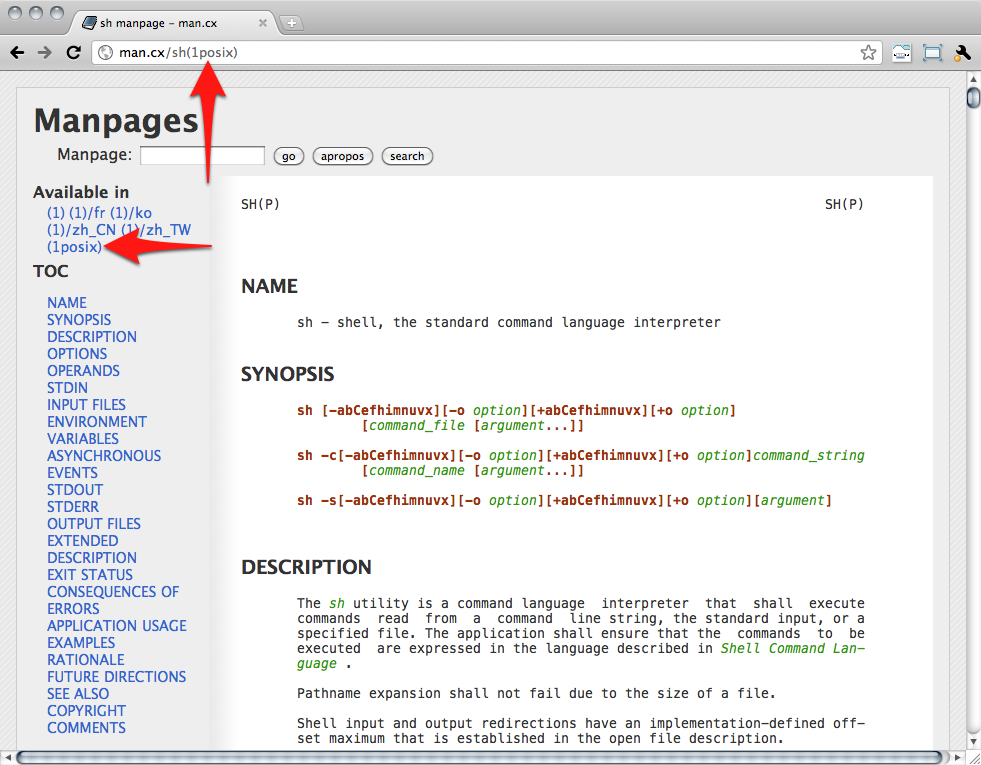
apt-get install manpages-posix